Your chair is the starting point for setting up a workstation: it determines how high you sit, how your back is supported and where your arms and feet end up. This guide explains what to look for in an office chair and footrest, drawing on Safe Work Australia's model Code of Practice and WorkSafe guidance.
This guide is general information written in our own words, based on the official sources listed at the end. It isn't health, legal or tax advice. Everyone's body, work and space are different, so if you have pain or a health condition, talk to a health professional, and check tax questions with the ATO or a registered tax agent. We don't sell furniture or recommend particular brands or shops.
What the Code of Practice says
Safe Work Australia's model Code of Practice on managing the work environment and facilities says that, for seated tasks, workers should have seating that:
- provides good body support, especially for the lower back;
- provides foot support, preferably with both feet flat on the floor, otherwise a footrest should be provided;
- allows space for leg clearance and freedom of movement.
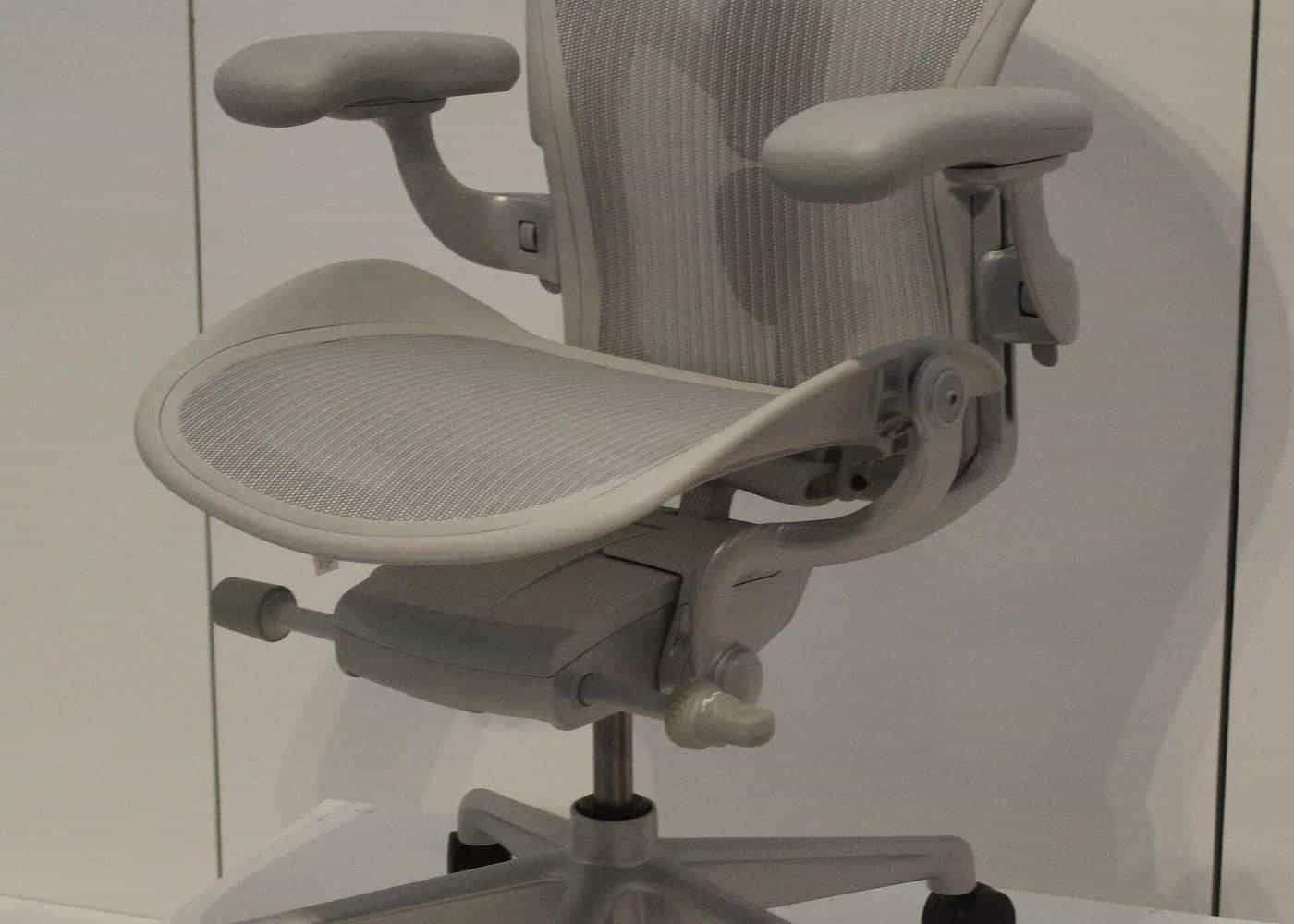
It says chairs should be fully adjustable to suit different-sized workers, with seat height, backrest height and backrest tilt adjustments, and shouldn't tip or slip. A five-point base is the most stable. Castors should be used on carpet, and glides or braked castors on hard surfaces.
Key features
Seat height adjustment. A gas lift lets you set the seat so your feet are flat and thighs angle slightly down, as Safe Work Australia's infographic describes. Check the range suits your height.
Backrest. It should support your lower back. Height and tilt adjustment let you fit the support to the curve of your spine. Some chairs have adjustable lumbar support.
Seat depth. A sliding seat lets you adjust so the front edge doesn't press behind your knees. Particularly useful for shorter or taller people.
Seat tilt. WorkSafe Victoria's working from home checklist describes adjusting the seat pan tilt so hips and thighs are at right angles or slightly greater.
Five-point base. The Code of Practice says a five-point base is the most stable.
Castors. Match castors to your floor: castors on carpet, glides or braked castors on hard floors.
Armrests. Safe Work Australia's infographic suggests using a chair with no armrests, or making sure armrests don't stop the chair moving close to the desk. WorkSafe Victoria's checklist says chair arms should be absent or low enough to clear the desk. Adjustable or removable armrests give flexibility.
Fitting the chair to the desk
Set the chair first, then the desk. If your desk is fixed and too high, raise the chair until your elbows are just above the desk surface, then use a footrest so your feet are supported. If you can't get close because of armrests, lower or remove them.
Footrests
WorkSafe Queensland advises using a footrest if your feet can't comfortably sit flat on the floor after adjusting your chair. It says to check the height so your hips and knees are level, and that the footrest should be stable, large enough to comfortably rest both feet and sloped for ankle comfort. Avoid using boxes or bins that can slide or collapse.
For standing work, Safe Work Australia suggests a footrest large enough for the whole foot, so people can stand with either foot raised.
Trying before you buy
A chair that suits one person may not suit another. If you can, try a chair for more than a few minutes, adjusting every control. Check the adjustment range, the seat width and depth, and the backrest height for your body. Ask about the warranty and the availability of spare parts such as gas lifts and castors.
Stools and sit-stand chairs
The Code of Practice notes that some standing tasks can be done using a sit-stand chair, so workers can support themselves while still standing. These are useful at standing desks and counters, but they aren't a substitute for a proper chair for long periods of seated work.
Maintenance
Check your chair regularly: castors rolling freely, gas lift holding height, backrest locking, and no cracks in the base. Replace worn parts or the chair if it no longer adjusts or feels unstable.
A quick chair setup
Sit right back in the chair. Adjust the seat height so your feet are flat and thighs angle slightly down. Adjust the backrest to support your lower back. Check there's a small gap between the seat edge and the back of your knees. Lower or remove armrests if they stop you getting close to the desk. Then adjust the desk and screen.
Chairs for different bodies
One size doesn't fit all. Shorter people may need a chair with a lower seat height and shorter seat depth, plus a footrest. Taller people may need a higher gas lift, a deeper seat and a taller backrest. People with larger bodies should check weight ratings and seat width. Many manufacturers offer different sizes or options.
Try the desk height checker
Our free desk height checker lets you enter your seated and standing elbow heights, and optionally a desk's lowest and highest settings. It suggests where your desk surface should sit and whether the desk's range covers your heights, using the AS/NZS 4442 ranges that WorkSafe Victoria cites. It runs entirely in your browser, and nothing you enter is sent anywhere.
Where our information comes from
Factual statements in our guides are based on official and authoritative sources, including Safe Work Australia, WorkSafe Victoria, WorkSafe Queensland, the Australian Government Department of Health, the Australian Taxation Office and the ACCC. We link to each source at the end of the page and write everything in our own words. We don't invent statistics, prices or product test results, and we don't rank or review brands.
Everyone is different
Workstation guidance describes general principles that suit most people. Your body, your tasks and your space are unique, and what feels comfortable for one person may not suit another. Use the guidance as a starting point, adjust until you're comfortable and, if you have pain or a health condition, get advice from a health professional such as a physiotherapist or occupational therapist.
Small changes add up
You don't need to replace all your furniture to work more comfortably. Raising a screen, moving a keyboard closer, adding a footrest or standing for phone calls can each make a difference. Start with the change that addresses your biggest discomfort, then review your setup again after a week.
Workplaces and employers
Employers have duties under work health and safety laws to manage risks to workers, including from workstations and from too much sitting or standing, so far as is reasonably practicable. That applies in offices and, in many cases, when people work from home. If your workstation isn't working for you, talk to your manager or health and safety representative.
Corrections and feedback
We review our guides against their sources and show the date each page was last checked. If you notice something out of date or incorrect, such as a change to ATO rates or workplace guidance, please tell us through our contact page. We read every message and correct mistakes promptly.
About this site
Office Desks is an independent information site. We aren't a furniture retailer, manufacturer, ergonomist, government agency or tax adviser, and we don't sell furniture or recommend particular brands or shops. Our guides are general information, not health, legal or tax advice.
Key points
- Chairs should adjust in seat height, backrest height and tilt, and not tip or slip.
- A five-point base is the most stable; match castors to your floor.
- Armrests shouldn't stop you moving close to the desk.
- Use a stable, sloped footrest large enough for both feet if needed.
- Set the chair first, then the desk and screen.
Frequently asked questions
What should an office chair have?
Safe Work Australia's Code of Practice says chairs should be fully adjustable, with seat height, backrest height and backrest tilt adjustments, and should not tip or slip. A five-point base is the most stable.
Are armrests good?
They can be, but Safe Work Australia's infographic suggests a chair without armrests or with armrests that don't stop you moving close to the desk.
What castors should I use?
Safe Work Australia says castors should be used on carpet, and glides or braked castors on hard surfaces.
When do I need a footrest?
If your feet can't rest comfortably flat on the floor after adjusting your chair. WorkSafe Queensland says it should be stable, large enough for both feet and sloped for ankle comfort.
Sources and further reading
Facts on this page were checked against these primary and official sources. Conditions change — confirm before you travel or buy.
- Model Code of Practice: Managing the work environment and facilities — Safe Work Australia
- Setting up your workstation (infographic) — Safe Work Australia
- Setting up your workstation — WorkSafe Queensland
- Working from home safety and wellbeing checklist — WorkSafe Victoria